Dental
Your front desk stops choosing between the phone and the patient.
A dental front desk is interrupted work by design: a patient at the counter, a hygienist needing a room turned over, and a phone that rings through both. Hey Quad takes the calls that do not need a person — moving a cleaning, confirming what to bring, checking what is on the books — and hands over the ones that do.
An answering service alternative for dental practices: an AI receptionist on the same business phone system and calendar as your front desk. How the AI receptionist works.
“Can I move my cleaning to Thursday — and do you take my new insurance?”
Nobody is free to pick it up. That call is the whole argument for the rest of this page.
What Quad says, and what it does
- Answers in the practice’s name and knows the hours, the address, parking, and what a new patient should bring.
- Looks up the appointment the caller already has, offers the openings that really exist on the calendar, and moves it.
- Takes insurance questions as a clean, written message with the plan name and member ID spelled back — it does not guess at coverage.
- Texts the confirmation so the patient has the day and time in writing, which is the version they actually keep.
When a person takes over
Clinical questions, billing disputes, anything about a treatment plan, and anyone who asks for a person all go straight to the desk — to an extension, or to a queue with hold music if the desk is busy. Quad says who is coming and why before it transfers, so the patient does not start over. When the practice is closed, an urgent call reaches whoever is covering, and everything else becomes a message waiting at 8am.
The actual flow
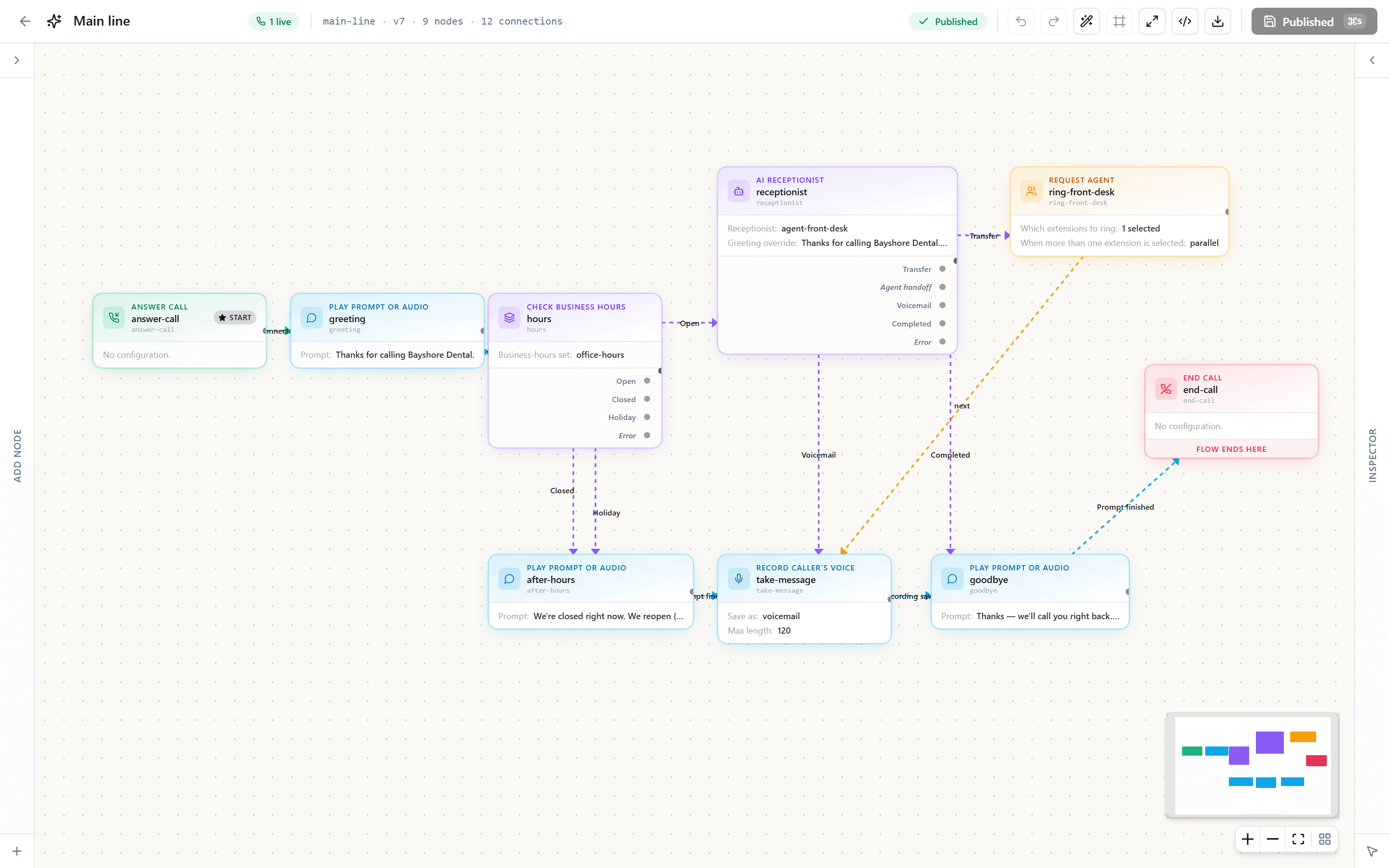
Not a diagram of a product vision. This is the shape of the call flow you get on day one — hours and holidays at the front, the receptionist in the middle, and three ways a call can end.
And this is where it lives. The same flow, open in the editor you get on day one — every branch above is a box you can move, rename or point somewhere else, without calling us.
What setting it up looks like
- Keep the number patients already have. We port it, or forward it while the port runs.
- Teach Quad the practice: hours, address, new-patient paperwork, which plans you are in network with, and what you want it to never answer.
- Set up the appointment types and the hours behind them, so “Thursday at 2” means a slot that is genuinely free.
- Give the desk a softphone — browser at the counter, mobile for whoever covers after hours.
We do this part with you on a call. Not a ticket queue, not a wizard you work through alone.
In the same account
The receptionist is one part. Every seat also has the rest of the system, so nothing it does has to be copied into another app.
One Inbox
Calls, voicemails, texts and receptionist conversations in one list, with Done and Undo.
Tasks
Turn a call or a text into a task with a reminder, or set a follow-up as you reply.
Booking pages
Customers pick a time themselves and reschedule or cancel from their confirmation.
The record on screen
The caller’s history, open tickets and next appointment open as the phone rings.
What it costs
We quote per seat for your business, in writing, within one business day. Every tax and fee for your address is its own line on the quote, and your bill matches it. A seat is a person, not a device.
- Calling minutes and texts on every seat, pooled across the team
- Inbound texts free
- The AI receptionist as an add-on with its own pool of minutes
- 12- or 24-month agreements, or month to month
- No setup fee
- Porting handled for you; desk phones on request, set up before they ship
Questions dental offices ask
- Will it answer insurance questions?
- No, and that is deliberate. Coverage depends on the plan, the year, the procedure and the remaining benefit, and a confident wrong answer on the phone becomes an argument at checkout. Quad takes the plan name and member ID down accurately and tells the patient when someone will call back with a real answer.
- Is a call recording or transcript a HIPAA problem?
- It is something to configure rather than ignore. Recording is off unless you turn it on and retention is yours to set. On the paperwork: there is a real business associate agreement you accept yourself during onboarding, and healthcare accounts stay blocked from going live until every vendor in our chain is covered by one — a gate we enforce in code, and one we have not finished, so tell us early if you handle protected health information. What we will not do is tell you that a phone system makes you compliant. The security page lists exactly what we have and what we do not.
- Can it stop the after-hours emergency call from going to voicemail?
- Yes. Closed-hours calls run their own path: Quad can page the doctor on call, or send everything else to voicemail with a transcript in your inbox before you are back in the building.
- What about the patients who just want a person?
- They get one. Asking for a human is a transfer, immediately, with no menu to argue with. Quad exists to protect the desk’s attention, not to keep patients away from it.
Read next
Get your itemized quote.
Tell us about the business and we send a written quote within one business day: every tax and fee for your address on its own line, and a bill that matches it.
Call 657-HEY-QUAD: our AI receptionist answers, takes your details and puts you through.