
Real estate
The sign call goes to voicemail once and it is somebody else’s buyer.
A buyer standing in front of a listing has their phone out and four other listings open. Hey Quad answers that call every time, works out which property they are looking at, captures them as a lead, and reaches the agent who owns it — while they are still standing there.
An answering service alternative for real estate teams: an AI receptionist on the same business phone system as every agent’s softphone. How the AI receptionist works.
“I’m outside the house on Elm — is it still available, and what’s the HOA?”
Nobody is free to pick it up. That call is the whole argument for the rest of this page.
What Quad says, and what it does
- Answers on the first ring, evenings and weekends, which is when buyers actually call.
- Works out which property they mean from whatever they say — a street name, a house number, a town — by matching it against the addresses in your records.
- Captures the lead properly: name, callback number, financing status if you ask for it, and which listing it was about.
- Reaches the listing agent, or books a showing on a calendar that is really open, and texts the caller a confirmation.
When a person takes over
Anything about price, terms, offers, or a negotiation goes to an agent — Quad does not represent you in a conversation about money. It transfers to the listing agent, and if that agent is on another call it skips straight to the next person in the team’s ring group, and takes a message with the property attached when nobody is free. Every one of those messages arrives with the listing already identified, so the callback starts halfway through.
The actual flow
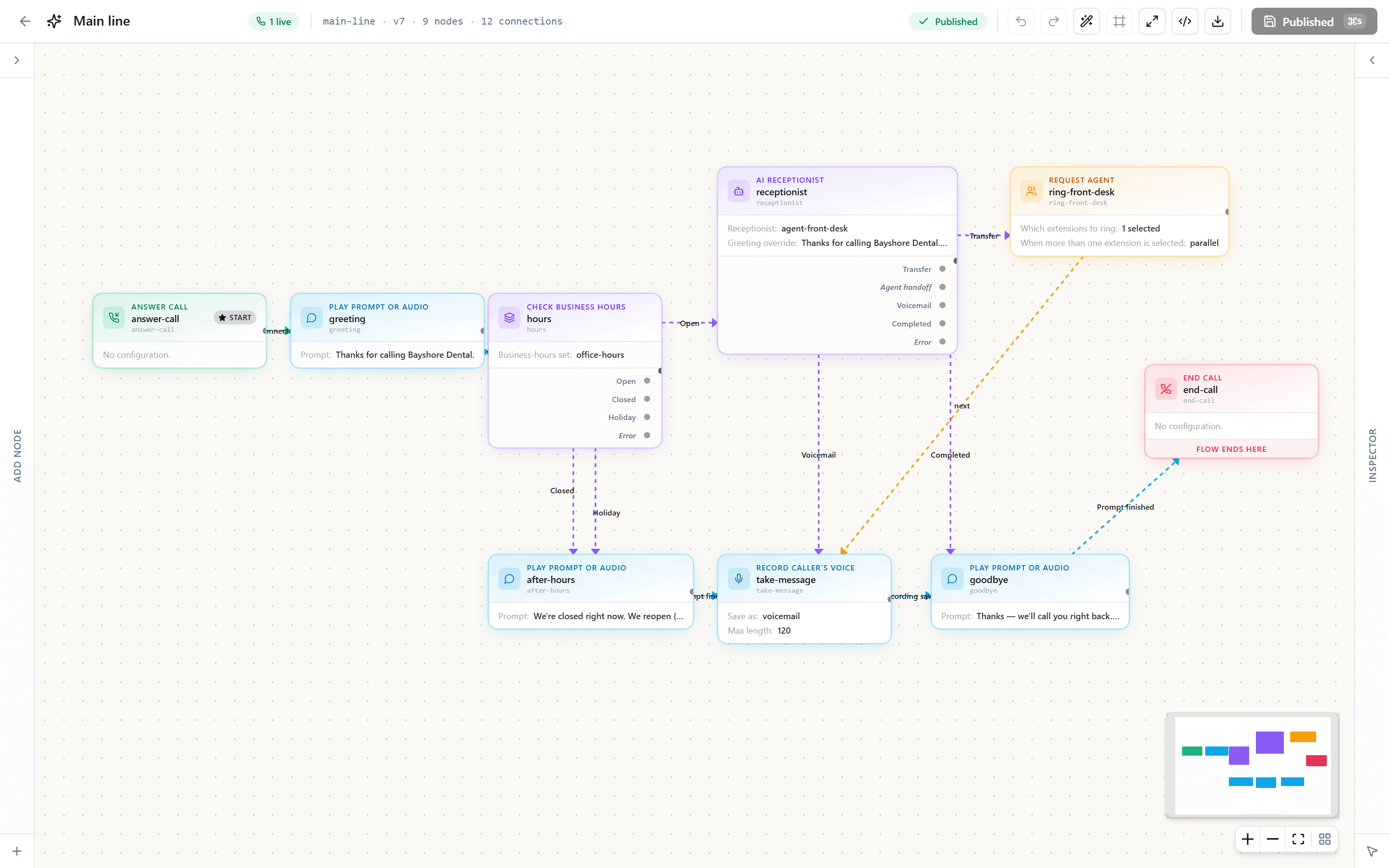
Not a diagram of a product vision. This is the shape of the call flow you get on day one — hours and holidays at the front, the receptionist in the middle, and three ways a call can end.
And this is where it lives. The same flow, open in the editor you get on day one — every branch above is a box you can move, rename or point somewhere else, without calling us.
What setting it up looks like
- Keep the number on the signs. Add a number per campaign or per listing when you want to know what is working.
- Load the properties so Quad can recognise an address a caller half-remembers.
- Set the routing: listing agent first, then the team’s ring group, then a message.
- Put the softphone on every agent’s phone so a transfer reaches them in the car.
We do this part with you on a call. Not a ticket queue, not a wizard you work through alone.
In the same account
The receptionist is one part. Every seat also has the rest of the system, so nothing it does has to be copied into another app.
One Inbox
Calls, voicemails, texts and receptionist conversations in one list, with Done and Undo.
Tasks
Turn a call or a text into a task with a reminder, or set a follow-up as you reply.
Booking pages
Customers pick a time themselves and reschedule or cancel from their confirmation.
The record on screen
The caller’s history, open tickets and next appointment open as the phone rings.
What it costs
We quote per seat for your business, in writing, within one business day. Every tax and fee for your address is its own line on the quote, and your bill matches it. A seat is a person, not a device.
- Calling minutes and texts on every seat, pooled across the team
- Inbound texts free
- The AI receptionist as an add-on with its own pool of minutes
- 12- or 24-month agreements, or month to month
- No setup fee
- Porting handled for you; desk phones on request, set up before they ship
Questions agents ask
- Will it talk about price or negotiate?
- No. It confirms what is published about a listing and stops there. Price movement, terms, offers and anything a licensee should be saying go to an agent, and Quad says that is what it is doing.
- Can I tell which sign produced a call?
- Yes, by giving that campaign its own number. Extra numbers are a small monthly amount each and every call to them is tagged in the reports, so “the postcard produced eleven calls” is a number you can read rather than a feeling.
- What happens when the listing agent is showing a house?
- The call rolls to the rest of the team before it rolls to a message, and the message that eventually lands already says which property it was about.
- Does it text?
- Yes — showing confirmations and follow-ups go out as texts from the same business number, and replies land in the same inbox as the call. Business texting requires a one-time carrier registration, which we file for you.
Read next
Get your itemized quote.
Tell us about the business and we send a written quote within one business day: every tax and fee for your address on its own line, and a bill that matches it.
Call 657-HEY-QUAD: our AI receptionist answers, takes your details and puts you through.